
Ask a question about your people
Ask questions about your people, paperwork and compliance in plain language, and get answers from your own Worknice records.
Before you get started
Available to account owners, in organisations where Ask Worknice is switched on. It's in beta, so if you can't see Ask Worknice in your sidebar, it isn't on for your organisation yet.
How Ask Worknice works
Ask Worknice is AI built into Worknice. Instead of opening screen after screen to find out who's missing a contract or whose certificates are about to expire, you ask the question the way you'd ask a colleague. Ask Worknice looks up your records, answers with the people involved, and links you straight to them.
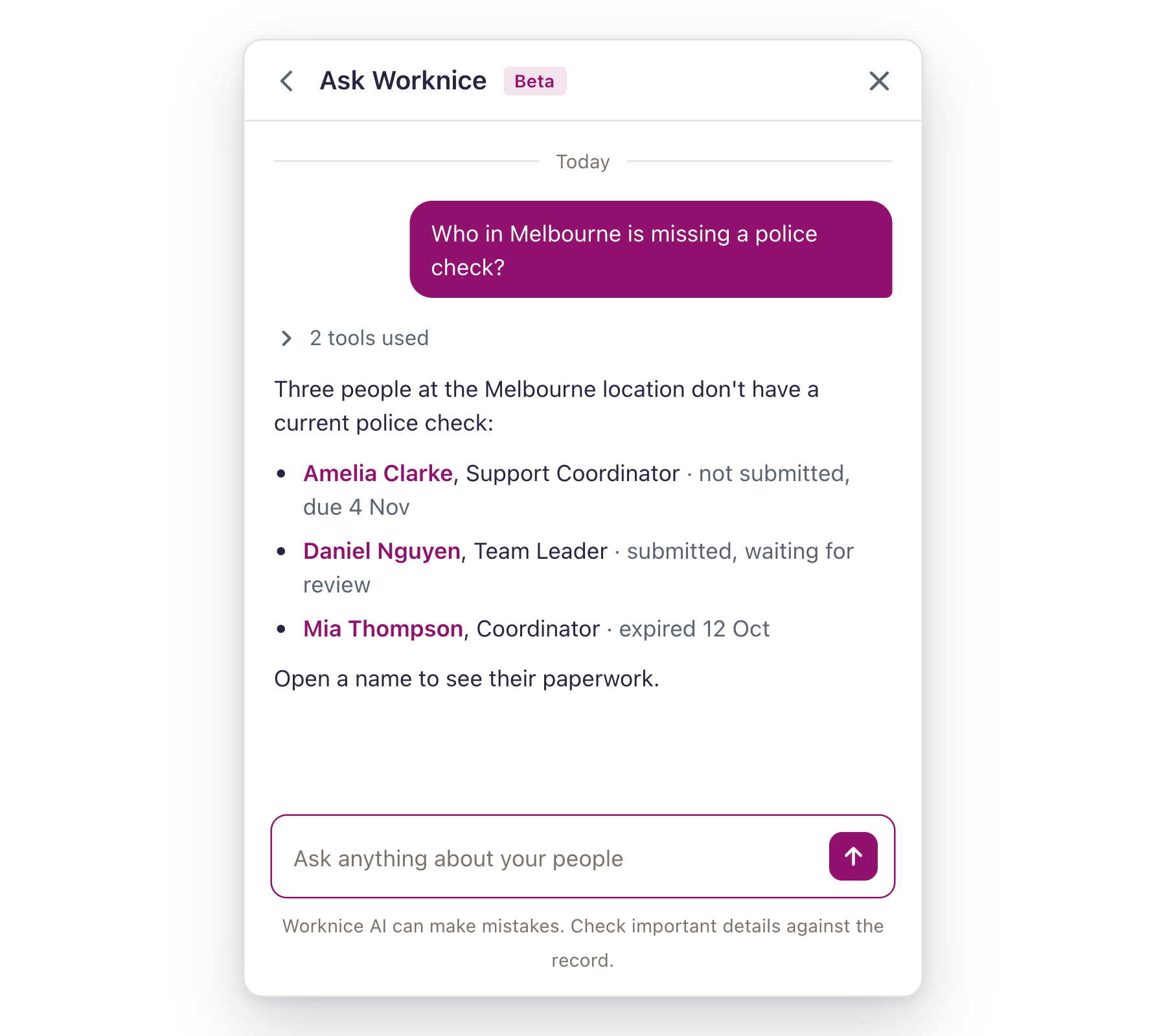
Open Ask Worknice
You can open Ask Worknice from two places:
Sidebar: select Ask Worknice. A panel opens on the right, and the page you were on stays where it is.
Home page: type into the Ask anything about your people box. Your question opens in the same panel.
What can Ask Worknice see?
Ask Worknice answers from your organisation's Worknice records. It reads:
People: names, positions, status, start dates, work anniversaries, locations, tags and reporting lines
Paperwork: what's required, outstanding, overdue or expiring, and for whom
Compliance: who is compliant in each compliance group, and what anyone non-compliant is missing
Your organisation: its locations and positions
Ask Worknice has the same access as you. It can only read what you could already see in Worknice yourself.
It can't yet answer questions about leave, performance, goals, tasks, workflows, permissions, custom fields, confidential notes, integrations, Insights or uploaded documents. If you ask, it tells you rather than guessing.
Find your way around
In the Ask Worknice panel, you can:
Ask a question by typing it in the box at the bottom and pressing Enter. Press Shift and Enter for a new line.
Stop an answer partway by selecting the stop button.
Follow up in the same conversation. Ask Worknice remembers what you've already asked, so "and which of them are in Sydney?" works after a question about missing paperwork.
Open a record by selecting a name or link in the answer.
See what it looked up by selecting tools used under an answer. Each lookup shows how many results it found, and a lookup that didn't work says so.
Go back to an earlier conversation by selecting the back arrow beside the title. Your conversations are listed newest first. Select one to reopen it, or New conversation to start again.
Rename or delete a conversation from the list. Each conversation is named for you from what it's about, and deleting one removes it for good.
Your conversations are private to you. Other account owners can't see them.
What you can do with Ask Worknice
Chase outstanding paperwork
Find out who still owes you something, across the whole organisation or one location.
Example questions:
"Who hasn't submitted their employment contract yet?"
"Which paperwork is overdue in Brisbane?"
"What paperwork is Amelia still missing?"
Get ahead of expiring certificates
See what's about to lapse while there's still time to renew it.
Example questions:
"Which certificates expire in the next 90 days?"
"Whose first aid certificate expires this month?"
"Has anyone's police check already expired?"
Check compliance
Find out who isn't compliant, and why, without opening every profile.
Example questions:
"Who is non-compliant in the Food Handling group, and what are they missing?"
"Is Daniel compliant?"
"What is Mia missing to be compliant?"
Answer questions about your people
Get quick answers about who works where, and who reports to whom.
Example questions:
"Who started in the last three months?"
"Who reports to Priya?"
"Who is coming up on five years of service?"
"Who works at our Perth location?"
Names, locations and paperwork types narrow an answer fast. "Who in Sydney is missing a police check?" gets you a shorter, more useful list than "Who is missing paperwork?".
Check an answer
Answers link to the people and records they mention, so you can open the record and act on it straight away. Tools used under each answer shows exactly what Ask Worknice looked up.
Ask Worknice can make mistakes. Check important details against the record before you act on them or pass them on.
Common questions
Can it change anything in Worknice?
No. Ask Worknice reads your records to answer questions. It doesn't create, edit or send anything.
Why did it say it couldn't answer?
Either the question is about an area it can't read yet (see What can Ask Worknice see?), or the information isn't in Worknice. It tells you rather than making something up.
What does Ask Worknice send to the AI model?
Ask Worknice is processed using Anthropic models, and your data is not used to train them. To answer a question, Ask Worknice sends the model work details such as names, positions, employment dates, and compliance and paperwork status. It never sends remuneration, bank, tax or superannuation details, emergency contacts, contact details, dates of birth or addresses.
Can my employees use it?
Not yet. Ask Worknice is for account owners.
How do I give feedback?
Email us at help@worknice.com with the question you asked and what came back. It's the fastest way to make Ask Worknice better at the questions you care about.
Related articles
You're All Done!
You can now ask Worknice about your people, paperwork and compliance, check what it looked up, and come back to a conversation later.
If you have any questions, please reach out to our support team at help@worknice.com or through the help section in Worknice.