
Worknice Enhancements in 2026
Everything we have shipped in 2026, newest first. What we are building next is at the top.
Coming up
What we are working on now. When something ships it moves down the page.
Ask a question about your people and get an answer
Answering a simple question about your people often means reading through the system yourself, screen by screen, and then double-checking the number before you send it to anyone. We are building a way to ask Worknice the question in your own words and get the answer back from the records you already hold. Starting with a small number of accounts.
September 2026
Bring more than one manager into a review
When someone works across two teams, or changed manager partway through the year, every manager with something to say can now write a review, and the primary manager still owns the rating.
More details
Add up to 10 additional managers to a reviewee from Edit managers, the same control you already use to change their manager. You can also add one from a review packet before it is shared.
Each additional manager gets an ordinary manager review, with the same template, instructions and due date.
Only the primary manager answers the performance and potential rating questions, so the official rating always comes from their review.
Additional managers see what the primary manager sees: the self review, the primary manager's review and the official ratings.
Once a cycle is completed, or someone's packet has been shared, their reviewers can no longer be changed.
Full walkthrough: Add additional managers.
For accounts on the Performance add-on.
Workflows that start themselves and finish cleanly
Put someone into a workflow from wherever you are looking at them, and let it start, assign and finish without chasing it.
More details
Add people from their profile, or in bulk from the People list or a custom table, and choose the workflow.
Set a workflow to Automatic to start someone's run the moment they are added, or Manual to hold it until you activate it. New workflows default to Automatic, and existing ones stay Manual until you change them.
Runs and groups now show Complete once every step is done, and a person can't be in the same workflow twice at once.
Task steps can go to the participant's manager, worked out when the step runs, so one workflow sends each task to the right person.
Full walkthrough: Create a workflow.
See where someone is up to without opening every tab
Before a probation conversation or a return from leave, generate a plain-language summary of a person from what Worknice already holds, instead of clicking through four areas to assemble the picture yourself.
More details
Open someone's Overview tab and select the sparkle icon in the Public profile card header. A few seconds later a banner at the top of the page carries a one-line version, and the full summary opens from there.
The summary covers an overview plus up to four sections: Performance, Compliance and paperwork, Leave and availability and Suggested actions. A section with nothing to say is left out rather than shown empty, so a short summary means a quiet record rather than a problem. Leave and Performance appear only where your account uses those parts of Worknice.
A few things worth knowing:
Account owners only. The person it describes cannot see it, and neither can their manager.
It only ever runs when you ask. Nothing is summarised in the background, and nobody has a summary until somebody generates one.
One refresh per person per day. After a summary is generated the refresh control is hidden for 24 hours, then comes back on its own.
A person with very little on file cannot be summarised. Worknice says so rather than filling the gaps.
Full walkthrough: Summarise a person's profile.
Run reviews on each person's own dates
Probation and anniversary reviews come due on different days for different people. A cycle can now set its due dates as a number of days per person, instead of one date that applies to everyone.
More details
A cycle picks how its due dates work while it is still in draft, on the Due dates tab, as two options:
Set for all. One due date per review type, applying to every review in the cycle. This is how cycles have always worked, it is still the default, and every cycle you already have stays on it.
Based on when added to cycle. A number of days per review type, worked out for each person.
A relative date counts from the later of the cycle's launch and the person being added to it. Someone added before launch counts from the launch date, and someone added afterwards counts from when they were added. Offsets run from one day to 1,825 days, and every date is worked out in your organisation's timezone.
Once a cycle is in progress the mode is fixed, along with which reviews the cycle includes. The numbers are not: changing an offset recalculates every review of that type, including reviews belonging to people who have since been archived, and an offset that would land the earliest date in the past is rejected rather than applied.
One thing to know before you use it. On a cycle using Based on when added, the due date does not yet appear on screen: not on a reviewer's own view of a review, the review lists, the manager performance page, or Your to-dos on Home. The date is missing rather than wrong, and overdue reminder emails still carry the correct date for each person. We are moving those screens across.
For accounts on the Performance add-on.
Share a completed review without closing the cycle
Somebody who has finished their review no longer waits for everyone else. Share their packet as soon as it is submitted, and leave the cycle running.
More details
The cycle's Overview tab carries a Share action on each row, and a Shared badge appears next to someone's name once it has been used.
The action appears when three things are true:
The cycle is in progress.
Every review in that packet has been submitted, so nobody sees a half-finished review.
The packet has not already been shared.
Closing a cycle still delivers everything outstanding, so nothing about the end of a cycle has changed. This is for the people who are ready early.
For accounts on the Performance add-on.
See who else is away before you approve leave
Approving leave no longer means checking the calendar first. The request shows anyone in the same team who is already away over those dates.
More details
It appears on the leave request page for managers and account owners, for standard and KeyPay leave.
Only approved leave is counted, and "team" means the people who report to the same manager.
If nobody else is away, the list doesn't appear.
Full walkthrough: Approve leave for your team.
August 2026
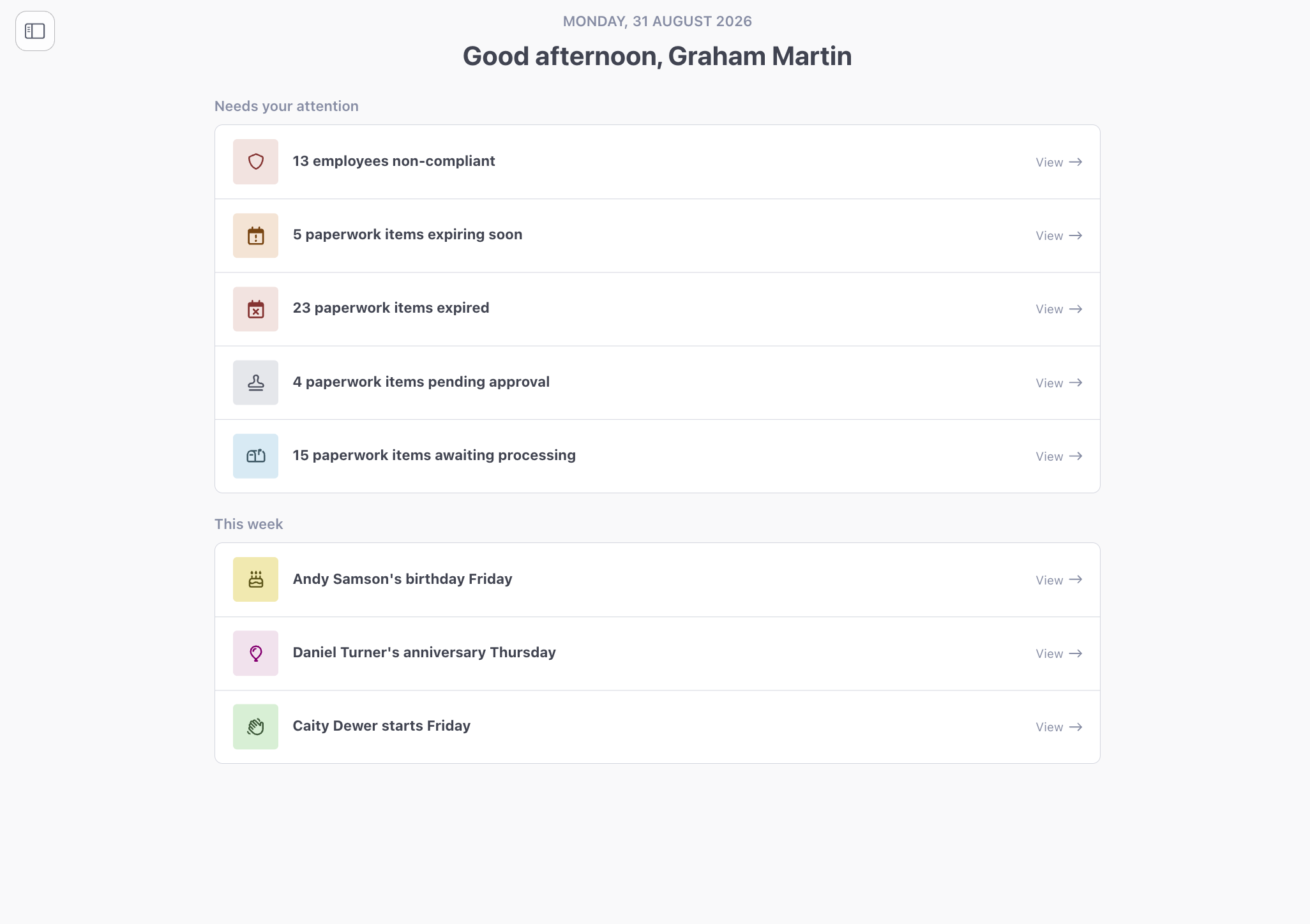
A Home page that opens on what needs you
Signing in now lands you on Home rather than the Inbox, showing what is still outstanding for you with a link straight to the records behind each number.
More details
Everyone lands on Home, and nobody sees all of it. What appears depends on your role.
Account owners get two sections about the organisation:
Needs your attention, up to six counts covering people who are non-compliant or at risk, and paperwork expiring soon, expired, pending approval or awaiting processing. A count of zero is left off, so the section only ever shows real work.
This week, covering leave, birthdays, work anniversaries and new hires, counted Monday to Sunday in your organisation's timezone. Where a row covers exactly one person it names them instead of showing a count.
Managers and employees get sections about themselves and their team:
Your to-dos, merging assigned paperwork, reviews and tasks into a single list sorted by due date.
Your leave, showing your balances and your next booked leave.
Your team this week, naming leave, birthdays, work anniversaries and start dates. Managers see their direct reports, employees see their peers and their manager.
Managers also get Your team's to-dos: leave requests waiting on them, reviews they need to complete, and direct reports who are non-compliant.
Most counts link to the screen that owns those records with the same filter already applied. One exception is worth knowing: paperwork has no pending approval filter, so that row opens the Draft filter and its number will not always match.
The Inbox is unchanged and still in the sidebar, directly below Home.
Goals
Record what someone is working towards and see where it is up to, without waiting for the next review cycle or asking anyone for an update.
More details
Set goals for anyone, with an owner and a period start and end.
Record progress as a percentage, with a status and an optional note.
Every update is kept, newest first, with who made it and when.
Statuses are Not started, On track, At risk, Completed and Cancelled.
Employees can create and track their own goals under Personal.
Managers can be granted view only or full access to their direct reports' goals.
Goals is available to accounts with the Performance add-on.
Comment on a Likert performance rating
A score on its own invites a follow-up conversation. Now the reasoning arrives with it, and you decide per question whether that is optional or required.
More details
The setting sits on the review template, alongside the question it belongs to.
A comment can only be required where the question itself is required.
Comment settings are stamped onto questions when a cycle launches, so cycles launched before this shipped are unaffected.
Useful anywhere a number on its own invites a follow-up conversation, which is most of the time.
An upgraded Xero leave integration
Employees request leave in Worknice and approved leave goes across to Xero in one step. Xero stays the source of truth for balances, so there is no second set of numbers to keep honest.
More details
Requests run against the balances Xero holds, so your team sees real numbers rather than a copy.
Approved leave collects in the app until a payroll admin submits the batch.
Leave entered directly in Xero comes back into Worknice on the next sync.
A leave type whose balance is hidden in Xero shows no balance in Worknice, and stays requestable.
Your team no longer opens a second system to book leave, and you no longer reconcile two sets of numbers.
Decide what your managers can see
Give team leaders exactly the visibility they need, one area at a time. Every organisation starts closed, so nothing is exposed by default.
More details
Managers can now be given access to their direct reports, one area at a time, and what a manager sees is set by an account owner rather than fixed by the role.
There are seven areas, each set on its own:
Emergency contact
Compliance
Performance
Goals
Employment, which includes pay
Leave
Confidential notes
Every area starts at No access. Most are view only once granted, while confidential notes can be set to View and add, and goals to Full access.
A few things worth knowing:
Granting the employment area exposes pay, so grant it deliberately.
Managers keep the leave and reviews assigned to them whatever these settings say.
Compliance badges appear on a manager's team page once you grant them Compliance.
July 2026
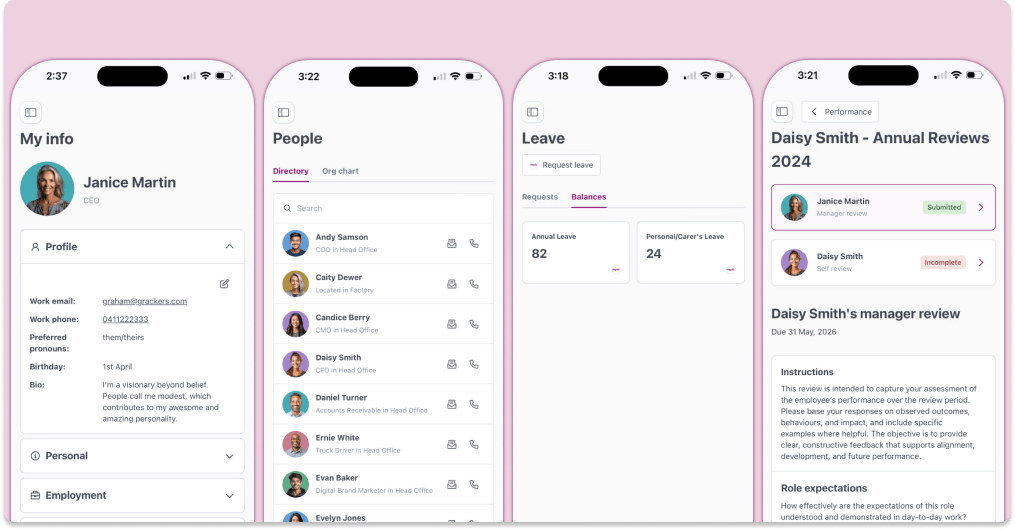
A rebuilt employee experience
The people who use Worknice least often should find it the easiest. Every employee-facing page has been rebuilt for that, and it works properly on a phone.
More details
The employee experience sits at the heart of Worknice.
Whether employees are updating their details, completing onboarding tasks, submitting forms, or finding information, every interaction shapes how they experience your organisation.
That's why we've refreshed the entire employee experience, making it faster, simpler, more accessible and more engaging across every device.
Introducing the new employee experience
We've redesigned every employee-facing area of Worknice with a focus on:
✅ Improved visual design
✅ Better mobile accessibility
✅ Simpler navigation and workflows
✅ Faster completion of common tasks
The result is a modern self-service experience employees will actually enjoy using.
Paperwork versioning
Paperwork can pile up even in the digital age. Previously, every version of a policy, form or certificate was visible to an employee on their profile.
Now, we only show the latest or current version. But don't worry, in the event an employee wants to review older versions, they are only a click away.
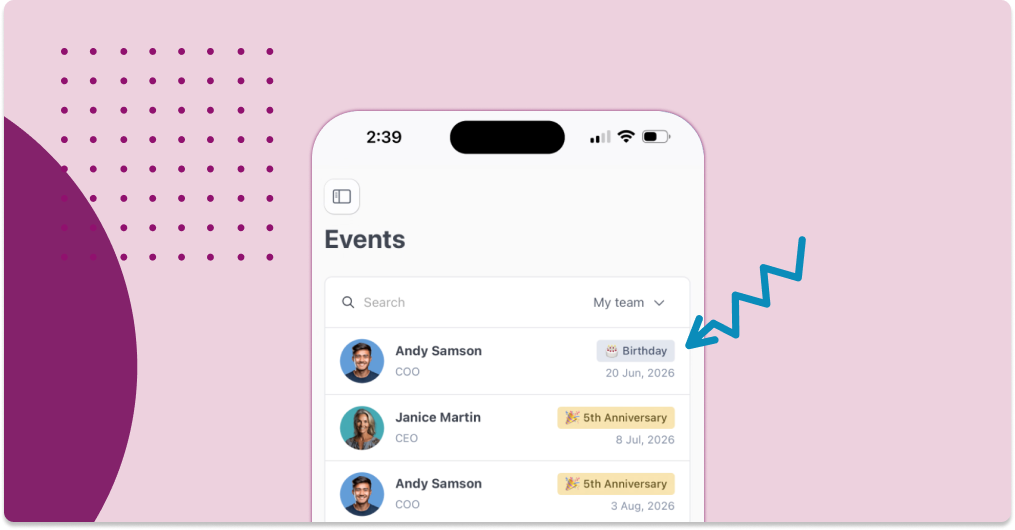
Introducing the new Events section
We've also added a brand new Events page, giving teams an easy way to celebrate milestones and stay connected.
Employees can now see upcoming:
🎂 Birthdays 🎉 Work anniversaries
Earlier in 2026
Performance review upgrades
Run a review cycle across hundreds of people without it turning into a chasing exercise, then see what the results actually say.
More details
We rolled out a major upgrade to the Performance add-on in Worknice, designed to make reviews scalable for HR teams, simple for managers and employees to complete, and far more insightful.
Run high-impact performance reviews in minutes. Easily define participants, launch cycles across teams, and keep everything on track with smart reminders and clear visibility. Managers get seamless workflows and real-time oversight, while employees enjoy a simple, guided experience. Back it all with powerful insights like 9-box grids, heat maps, and live progress tracking so you can move faster and make better talent decisions.
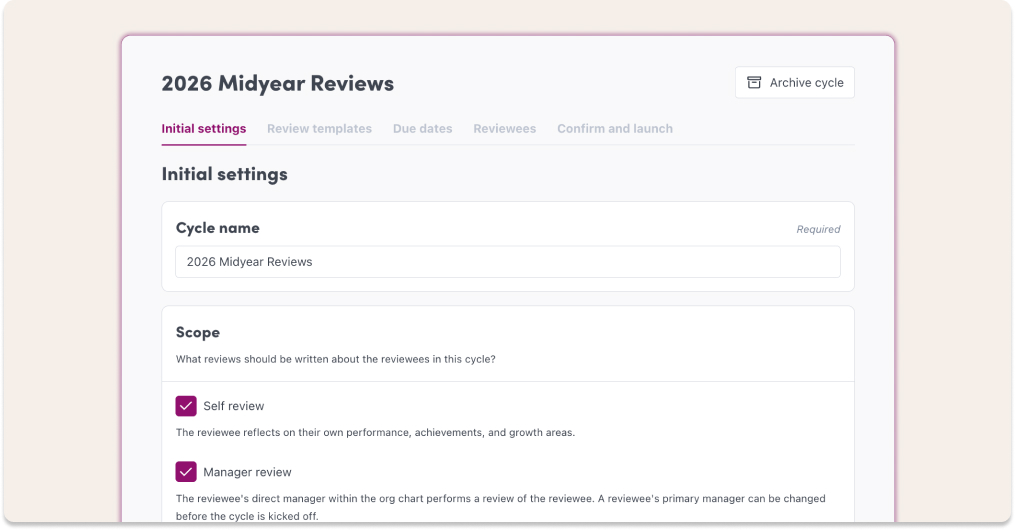
New cycle configuration
Scopes — Define who’s in scope for a cycle; self review and / or manager
Due dates — Enforced deadlines and sensible reminders.
Pick participants at scale — Select hundreds of employees in one go.
Deploy in bulk — Launch review cycles across teams/orgs with one action.
Packet sharing — Share pre-built review packets to speed rollouts.
Templates
Reorder questions — Drag-and-drop to craft the flow you want.
Required / optional — Make fields mandatory or optional to match your process.
New notifications
Due-date reminders — Smart nudges so reviewers actually complete their reviews.
Accessibility
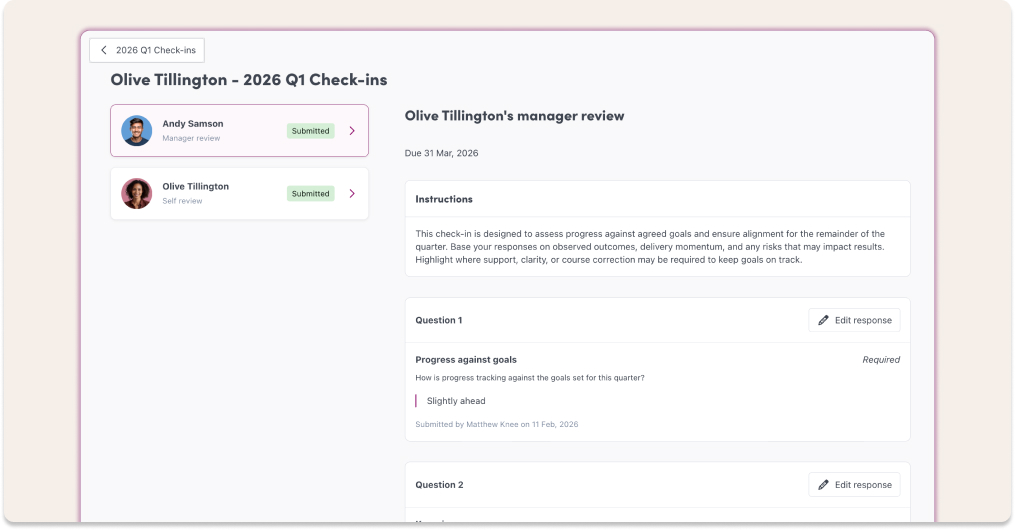
Quick toggle between reviews — Flip between an employee’s reviews in one click for fast context and calibration.
Insights
Cross-cycle analytics, trends and meaningful signals.
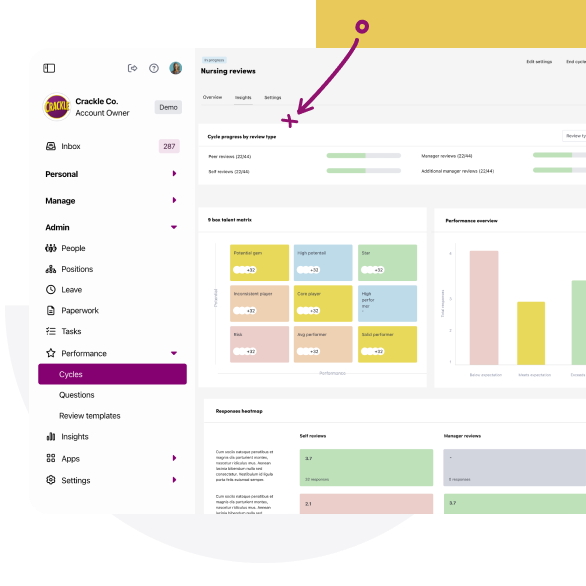
Cycle progress

This helps you quickly identify:
Who has completed their reviews
Where follow-up may be required
9 box talent matrix
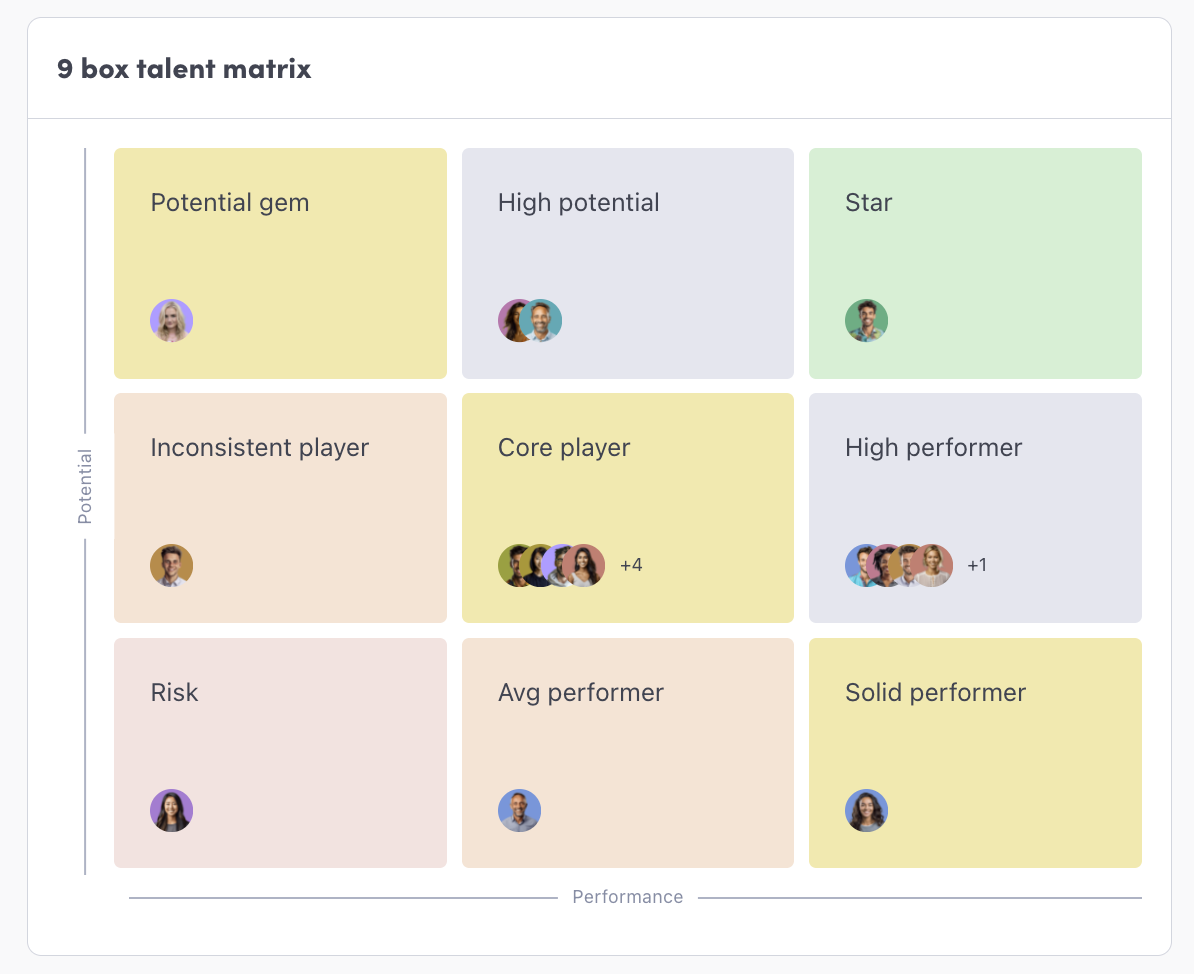
The 9 Box Matrix visualises employee performance against potential, and categorises employees into segments such as:
High potential
Solid performer
Risk
Star
This helps with talent planning and succession decisions.
Performance overview
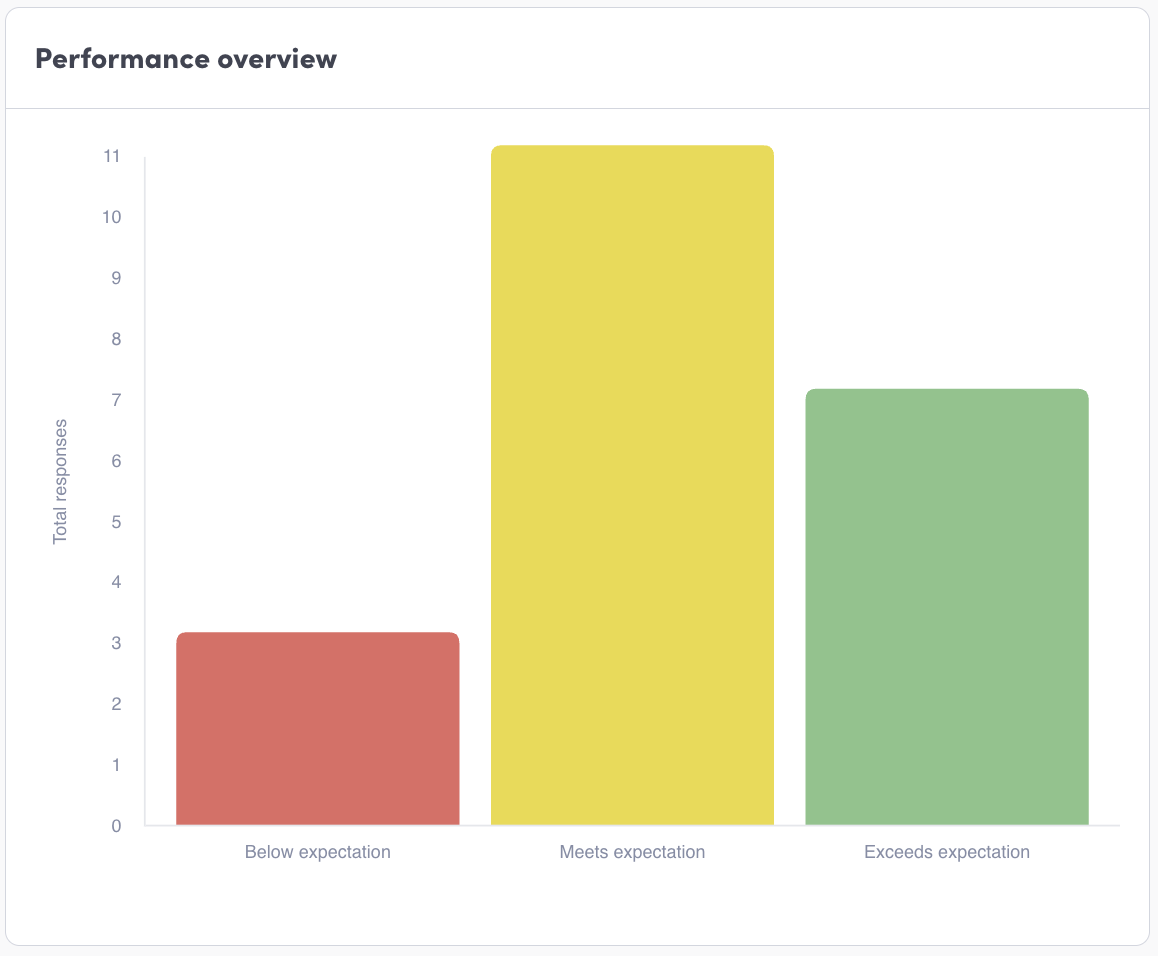
The Performance Overview chart shows the distribution of performance ratings across your organisation.
Responses heatmap
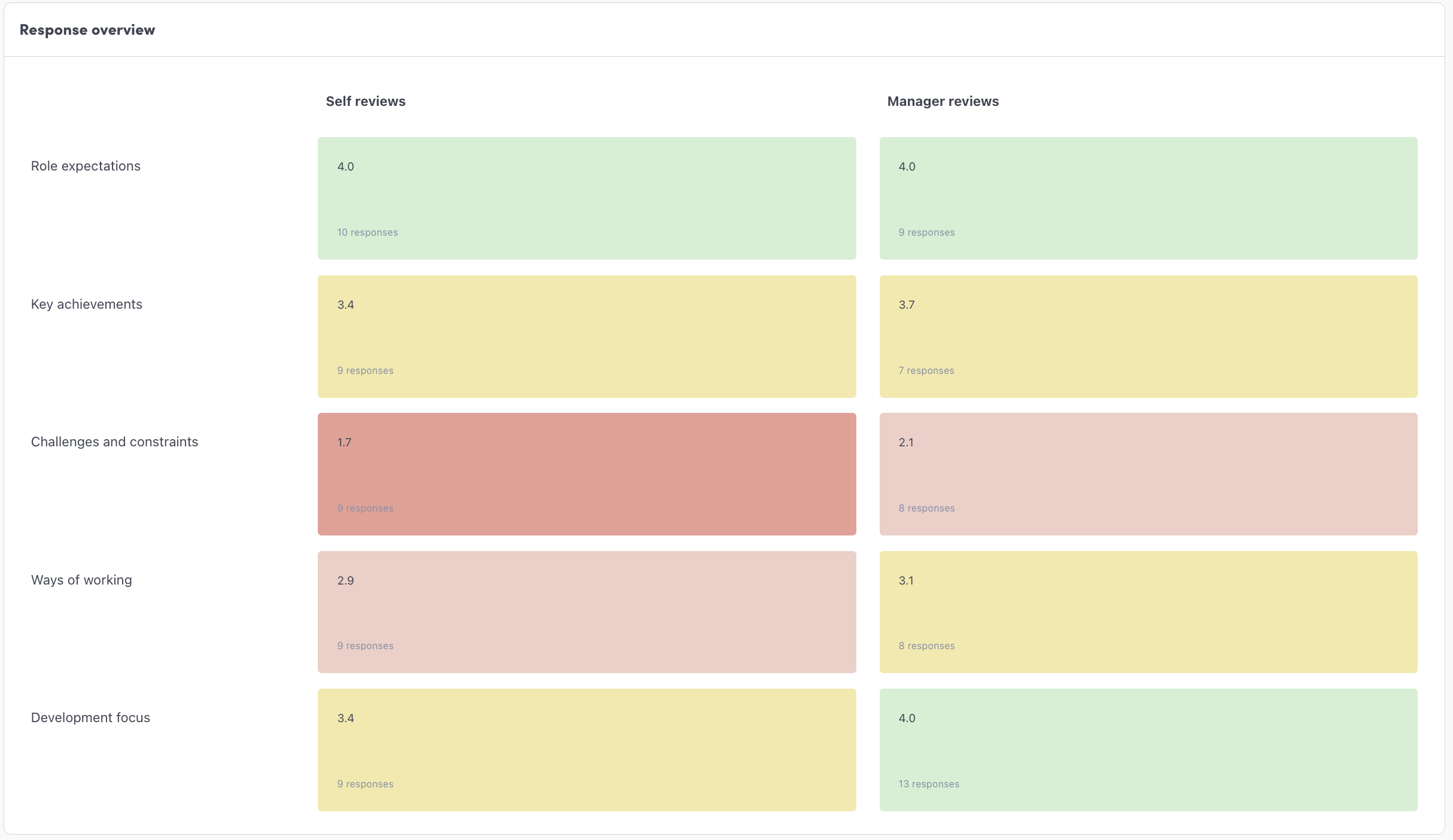
The Responses Heatmap shows aggregated responses across review questions.
Works with any Likert scale question
Displays average scores and response counts
Compares Self vs Manager responses
This helps you identify trends in feedback, spot alignment or gaps between employees and managers, and highlight areas needing attention.
Data tables
Your people data in one live, filtered view instead of an export, with bulk actions on whoever you select.
More details
Worknice brings your people data together by connecting with systems like payroll, keeping information from multiple sources available to HR, Finance and any other related team.
Until now, that data lived across individual person profiles in Worknice, making it difficult to view and manage at scale. Data tables bridges that gap.
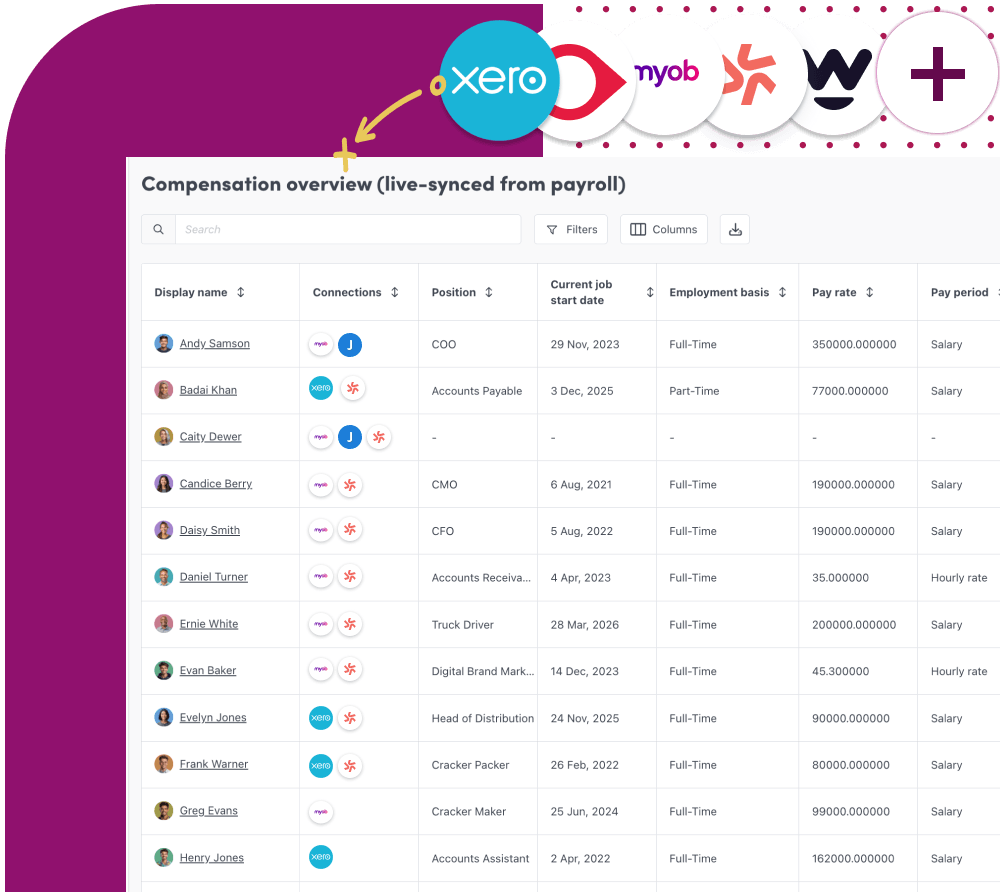
Managing people data shouldn’t mean juggling spreadsheets, exports, profiles or outdated reports. With Data tables, Worknice gives you a single, updated view of your data with saved and filtered tables of your own creation.
Why you’ll love Data tables
Up-to-date data sourced from connected apps (like payroll) and Worknice self-service.
Bring your data together into configurable, trusted views.
Create tables that suit you and your role. Each Account owner can create their own.
Configure column width and order columns with drag and drop functionality.
Act on many people at once. Select people in a table and assign paperwork, add or remove them from a compliance group, invite or reinvite them, edit their location, or apply tag and integration actions.
No more rebuilding reports. No more second-guessing your data. Just clean, structured information. Ready when you are.
Compliance groups and insights
Group compliance requirements the way your organisation actually works, by role, location or employment type, and see the gaps before they matter.
More details
This is designed to give you a clearer, more actionable view of employee requirements and their compliance across your organisation. You can group compliance requirements in a configurable way, such as role, location, employment type, or department, and track compliance at scale.
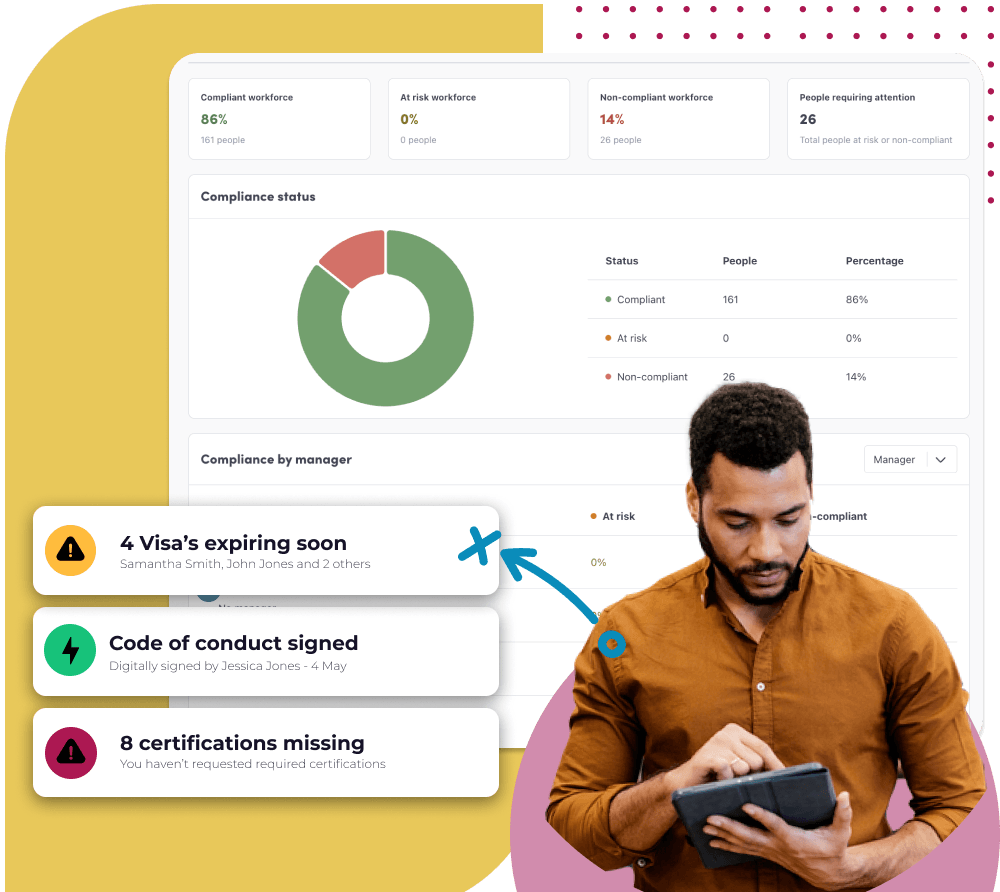
Whether you’re managing licences, certifications, training, or policy acknowledgements, Compliance Groups make it easier to ensure the right requirements are assigned to the right people automatically and accurately.
Why we think you'll love compliance groups and insights
Quickly identify compliance gaps across teams, paperwork or locations
Apply requirements consistently to the right people
Reduce manual admin and duplication
Gain clearer oversight with smarter, group-level reporting
Bulk assign paperwork
Assign a paperwork type to a whole cohort in a few clicks, instead of one person at a time.
More details
With Bulk Assign Paperwork, you can assign a paperwork type to multiple people at once, saving time and reducing manual effort.
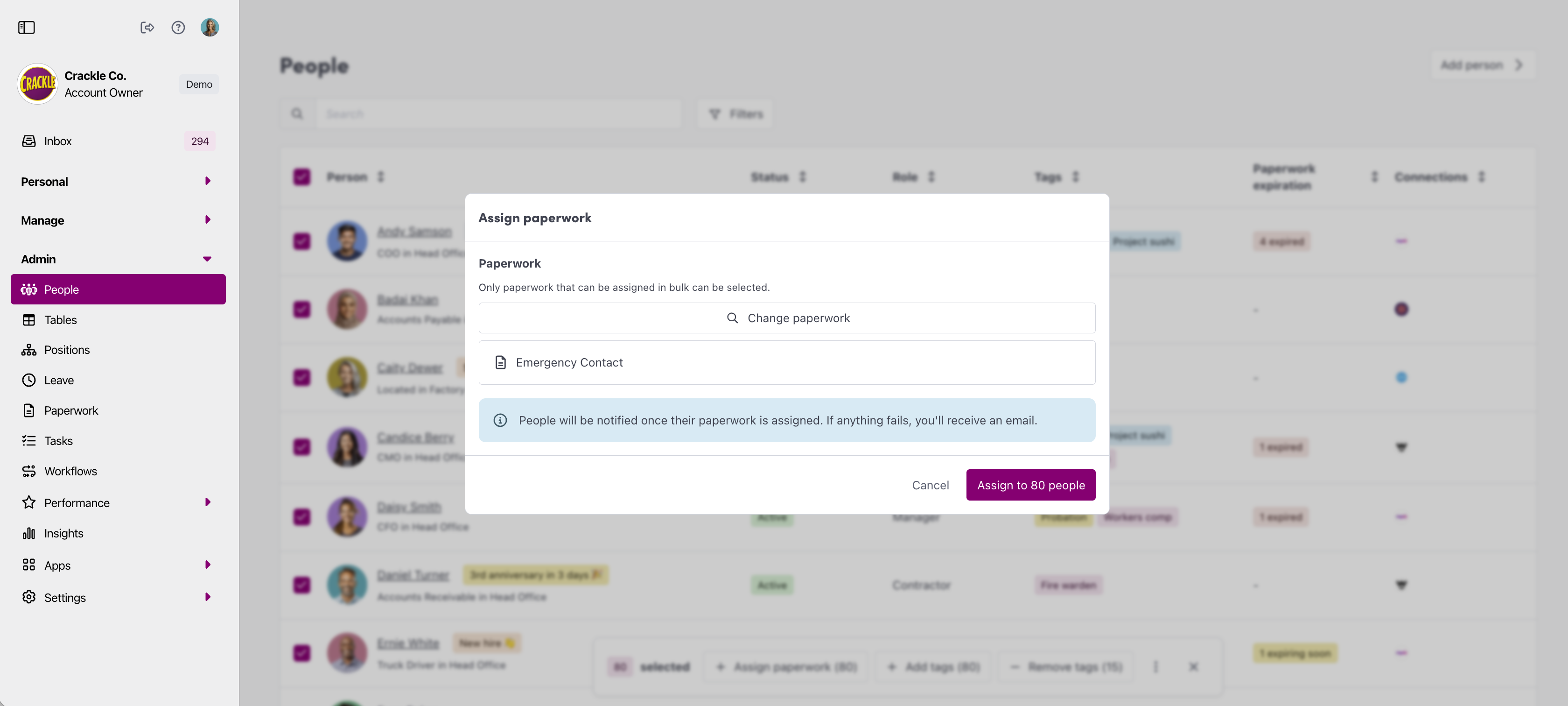
Why you’ll love Bulk Assign Paperwork
Assign paperwork to multiple employees in just a few clicks
Reduce repetitive admin work and manual errors
Ensure consistency across teams and processes
Spend less time managing paperwork.
Ready to give it a try?
Here’s how to get started:
Head to your Admin menu
Navigate to People
Select multiple people using the check boxes (you can filter first)
Use the Assign paperwork button in the bulk actions menu (bottom of page)
You’re good to go 🎉
Need inspiration?
Maintaining up to date emergency contact information is critical in case a time of need arises. Start by assigning everybody a new emergency contact form so your data is up to date.